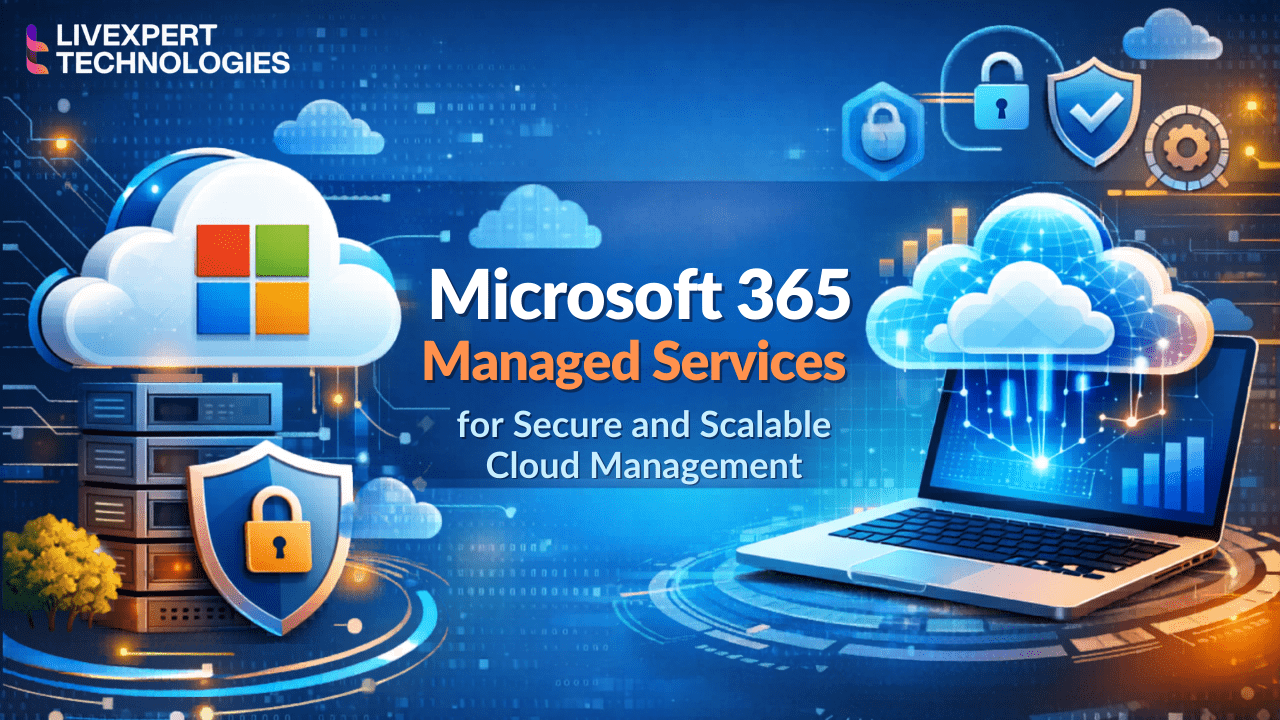
Microsoft 365 Managed Services for Secure and Scalable Cloud Management
In today’s fast-paced digital landscape, maintaining a secure, efficient, and compliant cloud infrastructure is no longer optional it is critical to business survival. Simplify your IT operations, drastically reduce overhead costs, and empower your global workforce with our comprehensive Microsoft 365 and Office 365 managed services.
From seamless tenant deployment and proactive system monitoring to advanced security, strict compliance enforcement, and ongoing end-user support, our team of certified cloud engineers handles your entire Microsoft ecosystem. Stop wasting your internal IT team’s valuable time on password resets and permission errors. Let a specialized Microsoft 365 Managed Services Provider transform your cloud infrastructure into a highly secure, automated, and scalable powerhouse.
1. What is Microsoft 365 Managed Services?
Microsoft 365 managed services refer to the outsourced administration, continuous monitoring, security management, and end-user support for Microsoft 365 cloud environments. This includes the expert management of core applications like Exchange Online, SharePoint, OneDrive, Microsoft Teams, and Microsoft Defender.
By partnering with a dedicated Microsoft 365 managed service provider, businesses can significantly lower their IT overhead, enforce strict industry compliance (such as HIPAA or SOC 2), and guarantee 99.9% network uptime. Instead of navigating the complexities of the Microsoft cloud alone, organizations rely on certified engineers to handle architecture optimization, threat protection, and daily technical support.
2. Microsoft 365 Architecture and Platform Overview
To truly optimize an enterprise cloud environment, you need a managed services partner who deeply understands the technical intricacies of the complete Microsoft ecosystem. General IT support is not enough; you need specialists in Microsoft 365 administration.
Below is an overview of the core architectural components we manage, secure, and optimize for our clients.
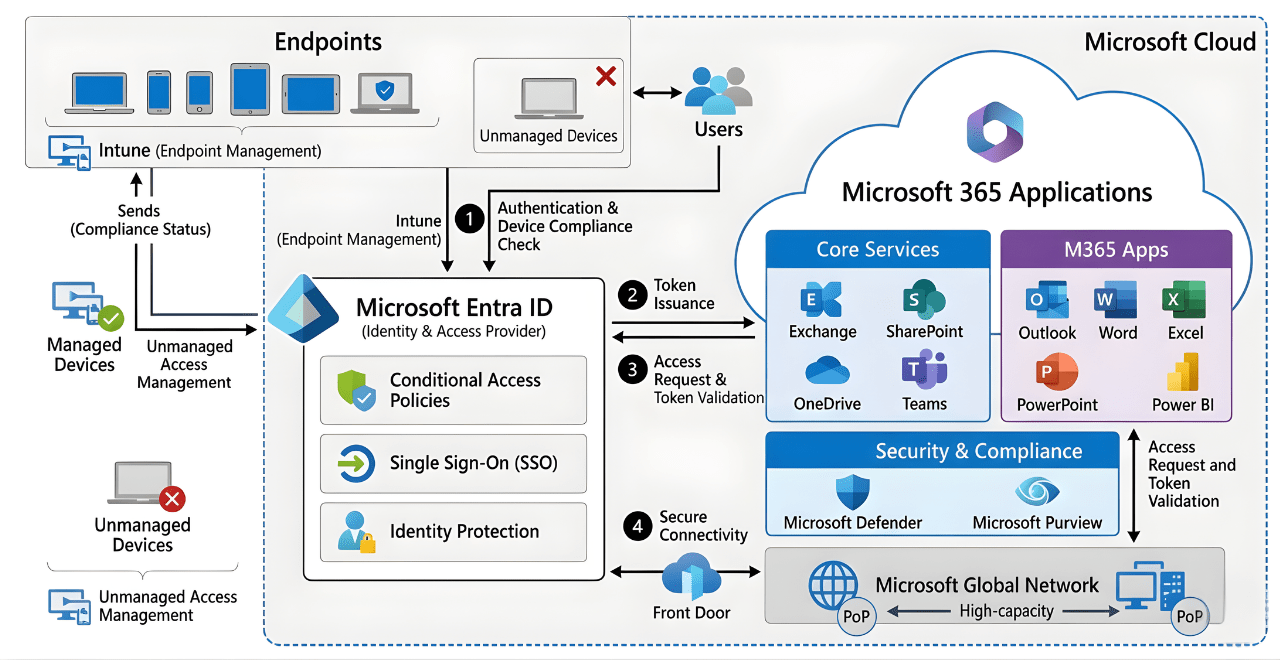
Exchange Online: Enterprise Email and Archiving
Exchange Online is the backbone of corporate communication. We go beyond basic mailbox creation. Our management includes configuring advanced mail flow rules, setting up rigorous spam and phishing filters, managing shared mailboxes, and enforcing strict data retention policies. We ensure your email infrastructure remains highly available and protected against the latest social engineering attacks.
SharePoint Online: Intranet and Document Management
SharePoint is a powerful tool, but without proper governance, it quickly becomes a disorganized maze of files. We architect secure SharePoint environments by building logical site structures, establishing strict role-based access control (RBAC), and managing document lifecycles. This ensures your teams can collaborate efficiently while preventing unauthorized access to sensitive corporate data.
OneDrive for Business: Secure Personal Cloud Storage
While SharePoint is for teams, OneDrive is for individual users. We manage OneDrive synchronization issues, configure external sharing permissions to prevent accidental data leaks, and ensure all local files are continuously backed up to the cloud. If a user’s local device is compromised by ransomware, our architecture ensures their OneDrive data can be instantly restored.
Microsoft Teams: Unified Communication and Telephony
Teams has evolved from a simple chat app into a complete virtual workspace. Our managed services M365 team helps structure Teams channels, integrates third-party business applications, and manages Microsoft Teams Voice (telephony). We also implement governance policies to prevent “Teams sprawl” the unchecked creation of unused groups and channels that clutter your environment.
Microsoft Entra ID (Formerly Azure Active Directory)
Identity is the new security perimeter. We manage your Microsoft 365 management service account utilizing Microsoft Entra ID to centralize identity and access management. This includes deploying Single Sign-On (SSO) for seamless app access, managing guest user permissions, and auditing user sign-in logs to detect anomalous behavior from unrecognized locations.
Microsoft Defender: Advanced Threat Protection
Relying on default security settings is a major risk. We deploy and manage Microsoft Defender XDR (Extended Detection and Response) across your entire tenant. This includes Defender for Endpoint (antivirus and malware protection), Defender for Office 365 (safe links and safe attachments in emails), and Defender for Cloud Apps (monitoring shadow IT).
Microsoft Intune: Mobile Device and Application Management
With the rise of remote work and Bring Your Own Device (BYOD) policies, securing endpoints is vital. We utilize Microsoft Intune to register corporate and personal devices. We enforce compliance policies (such as requiring encrypted hard drives and complex PINs) and can remotely wipe corporate data from lost or stolen devices without touching the user’s personal data.
The Power Platform: Power BI and Power Automate
A modern cloud environment should work for you automatically. We assist organizations in leveraging Power Automate to build custom workflows (e.g., automating employee onboarding or document approval processes). We also ensure Power BI data connections are secure, allowing your executives to safely visualize real-time business intelligence dashboards.
3. Comprehensive Microsoft 365 Services List
Managing a modern workplace requires more than just assigning licenses; it demands proactive administration across a vast ecosystem of applications. As a premier Microsoft 365 managed service provider, our end-to-end support covers every application within the Microsoft 365 services list. We ensure that your workforce remains productive, secure, and fully supported 24/7.
Daily User and License Management
One of the largest hidden costs in IT is unused or misallocated software licenses. Our team continuously audits your Office 365 and MS365 environments to ensure you are only paying for what you actively use.
Onboarding and Offboarding: We automate the creation of user accounts, application of appropriate licenses, setup of MS Outlook mailboxes, and assignment to proper security groups. When an employee leaves, we instantly revoke access, forward incoming emails, and securely archive their OneDrive and SharePoint data to protect corporate intellectual property.
License Optimization: We analyze your usage metrics to downgrade inactive users to cheaper licenses (e.g., moving from an E5 to an F3 for frontline workers) or reallocate idle licenses, ensuring maximum ROI for your Microsoft Office 365 investment.
Helpdesk and Application Support
Your internal IT team should be focused on strategic business growth, not troubleshooting application errors. We provide comprehensive helpdesk support for the entire suite of MS Office applications. Whether your team is utilizing modern M365 tools or relying on legacy O365 Office setups, we resolve issues instantly.
Email & Communication: Troubleshooting mail flow issues in Outlook 365, configuring Outlook Office 365 delegates, and resolving Teams audio/video routing problems.
Productivity Apps: Expert assistance with Word, Excel, PowerPoint, and MS One Note synchronization issues.
Access & Authentication: Resolving user lockouts, resetting MFA tokens, and fixing complex Single Sign-On (SSO) or Entra ID synchronization errors so your employees can get back to work without delay.
Proactive Monitoring with Enterprise Tools
We do not wait for things to break. Utilizing enterprise-grade RMM (Remote Monitoring and Management) solutions, including integrations with platforms like Microsoft 365 ManageEngine, we actively monitor the health of your cloud environment. We track service degradation, analyze storage thresholds, and detect unauthorized access attempts in real time.
4. Microsoft 365 Migration and Deployment Services
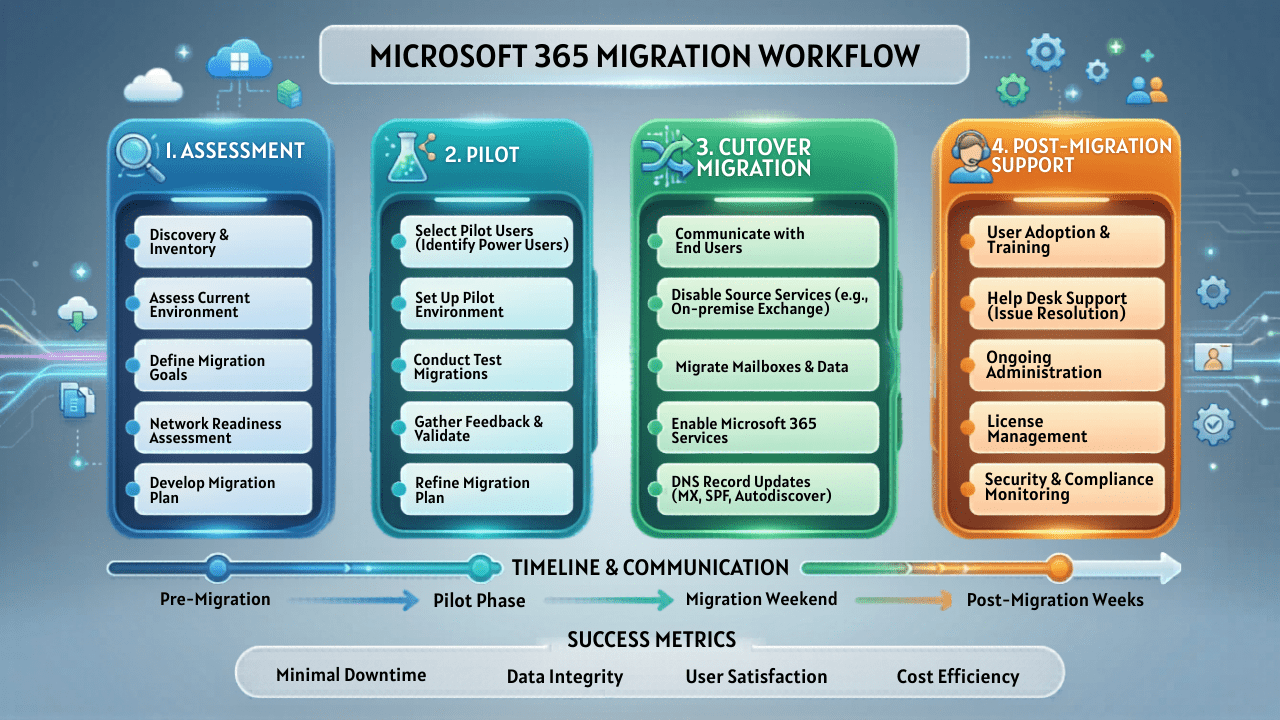
Whether you are migrating from a legacy on-premise server, moving away from a competitor’s cloud, or consolidating multiple tenants after a corporate merger, data loss is not an option. Our certified engineers execute flawless cloud migrations with zero downtime and zero data loss.
On-Premise Exchange to Microsoft 365 Migration
Maintaining physical exchange servers is expensive, risky, and prone to hardware failure. We help organizations modernize by moving their legacy mailboxes to Exchange Online. We handle the complex routing of MX records, synchronization of Active Directory, and seamless transfer of public folders.
Google Workspace to Microsoft 365 Migration
Many growing enterprises find that they need the advanced security and enterprise capabilities of the Microsoft ecosystem. We specialize in Google Workspace (formerly G Suite) to M365 migrations. We meticulously map Google Drive files to OneDrive and SharePoint, convert Google Docs to MS Office formats, and migrate Gmail labels into perfectly structured Outlook 365 folders.
Hybrid Cloud Deployments
For heavily regulated industries or enterprises with legacy applications tied to local servers, a 100% cloud environment may not be immediately possible. We design and deploy robust hybrid environments. This allows your on-premise Active Directory and Exchange servers to securely coexist and synchronize with your Microsoftoffice365 cloud tenant, providing a seamless experience for end-users.
Tenant-to-Tenant Migrations (M&A Scenarios)
During mergers and acquisitions, integrating IT systems is often the biggest hurdle. We specialize in complex tenant-to-tenant migrations, securely merging separate Microsoft 365 environments into a single, unified corporate tenant while maintaining data integrity and enforcing unified security policies.
🔗Learn more about our customized Microsoft 365 Migration Services
5. Microsoft 365 Security and Compliance Management
Cyber threats are evolving faster than ever. Phishing, ransomware, and insider threats frequently target poorly configured cloud environments. Our managed services M365 approach is rooted in the Microsoft Zero Trust Security Framework which assumes every access request is a potential breach until verified.
Hardening the Microsoft 365 Management Service Account
The most critical vulnerability in any cloud tenant is the administrator account. If compromised, hackers have the keys to your entire business. We heavily secure your Microsoft 365 management service account using Dedicated Admin Accounts, Privileged Identity Management (PIM), and just-in-time (JIT) access to ensure administrative rights are only active when strictly necessary.
Multi-Factor Authentication (MFA) & Conditional Access
Basic passwords are no longer enough to protect your Micro Office 365 environment. We enforce company-wide MFA alongside advanced Conditional Access policies. This means access to your data is evaluated based on user location, device compliance, and real-time risk. For example, we can block a login attempt if a user suddenly tries to access MS365 from an unrecognized country or an unmanaged, infected personal device.
Data Loss Prevention (DLP)
You cannot control what you cannot see. We configure sophisticated Data Loss Prevention (DLP) policies to identify, monitor, and automatically protect sensitive information across Exchange Online, SharePoint, OneDrive, and Teams. If an employee attempts to email a document containing credit card numbers, Social Security Numbers, or proprietary patient data, the system will automatically encrypt the email or block the transfer entirely.
Regulatory Compliance and eDiscovery
For organizations in healthcare, finance, and legal sectors, regulatory compliance is mandatory. Our team ensures your 365 0ffice environment meets the strict technical safeguards required for HIPAA, GDPR, SOC 2, CMMC, and FINRA. We configure the Microsoft Purview Compliance Portal, establish immutable data retention policies, and assist your legal teams with robust eDiscovery searches during audits or litigation.
Advanced Threat Protection (Microsoft Defender)
We actively manage Microsoft Defender XDR to protect your environment against zero-day malware and targeted phishing campaigns. Safe Links and Safe Attachments automatically detonate suspicious files in an isolated sandbox before they ever reach your employees’ inboxes, neutralizing threats before they can execute.
🔗 Explore our comprehensive Microsoft 365 Security Solutions
6. Microsoft 365 Monitoring, Backup, and Support
An enterprise cloud environment is not a “set it and forget it” solution. It requires constant vigilance, rapid troubleshooting, and robust disaster recovery mechanisms. Our Microsoft 365 Managed Services provide the technical safety net your organization needs to maintain continuous operations without overburdening your internal IT department.
24/7 Proactive Monitoring and Alerting
Downtime costs money. We utilize advanced Remote Monitoring and Management (RMM) tools, including deep API integrations with platforms like Microsoft 365 ManageEngine and native Microsoft Graph security APIs, to maintain 24/7 visibility over your entire cloud infrastructure.
Service Health Tracking: We monitor the status of Exchange Online, SharePoint, and Teams routing, identifying latency issues or Microsoft-side outages before your users even notice them.
Security Anomaly Detection: Our automated systems flag suspicious activities, such as “impossible travel” logins (e.g., a user logging in from New York and Nigeria within five minutes), massive file deletions in OneDrive, or unauthorized forwarding rules being created in Outlook 365. We intercept and isolate these threats in real time.
Expert End-User Helpdesk Support
When your employees experience technical difficulties, they need immediate, expert assistance. We provide SLA-backed helpdesk support for all MS Office 365 applications. Unlike basic call centers, our certified engineers can troubleshoot deep architectural issues. Whether it is resolving complex sync errors in MS One Note, fixing corrupted PST files in MS Outlook, or diagnosing Teams call quality degradation, our team ensures your workforce remains highly productive.
Microsoft 365 Backup and Disaster Recovery (BDR)
A common and dangerous misconception among business leaders is that Microsoft automatically backs up all cloud data. According to the Microsoft Shared Responsibility Model, Microsoft is only responsible for the infrastructure uptime. You are responsible for your data. If an employee accidentally deletes a critical SharePoint site, or if a ransomware attack encrypts your 365 files, Microsoft cannot recover them for you after the standard retention period expires.
As your managed services M365 partner, we implement robust, third-party Cloud-to-Cloud backup solutions.
Automated Daily Backups: We capture immutable backups of all Exchange mailboxes, Teams chats, SharePoint document libraries, and individual OneDrive accounts up to three times a day.
Rapid Recovery & Low RTO: In the event of data loss, we can perform granular item-level restorations (e.g., restoring a single deleted email) or full-tenant point-in-time rollbacks with a Recovery Time Objective (RTO) measured in minutes, not days.
Protection Against Ransomware: Because our backups are air-gapped and immutable, they cannot be altered or encrypted by malicious actors, guaranteeing business continuity under worst-case scenarios.
7. Microsoft 365 Consulting and Licensing Optimization
Technology should drive business strategy, not hinder it. For organizations looking to scale, modernize, or restructure, our Microsoft 365 consulting services provide the architectural roadmap needed to maximize ROI and align your cloud infrastructure with your long-term business goals.
Cloud Readiness and Architecture Assessments
Before making major infrastructure changes, you need a clear understanding of your current state. Our cloud architects conduct comprehensive audits of your existing Office 365 or legacy on-premise environments.
Security Posture Scoring: We analyze your Microsoft Secure Score to identify vulnerabilities in your identity management, device compliance, and data protection configurations.
Shadow IT Discovery: We uncover unauthorized applications your employees are using outside of the sanctioned Microsoftoffice365 ecosystem and bring them under corporate governance using Microsoft Defender for Cloud Apps.
Tenant Consolidation Planning: For organizations undergoing mergers and acquisitions (M&A), we map out complex Active Directory trusts and cross-tenant collaboration strategies prior to the final migration cutover.
Licensing Optimization and Cost Reduction
Microsoft’s licensing structure is notoriously complex, with constant changes to SKUs and bundled features. Many enterprises waste thousands of dollars annually by over-provisioning licenses or buying overlapping third-party tools that are already included natively in their Microsoft 365 subscription.
We perform rigorous license auditing and right-sizing:
The E3 vs. E5 Dilemma: We help enterprise clients determine whether they truly need the advanced compliance and security features of Microsoft 365 E5, or if an E3 license combined with specific security add-ons is more cost-effective.
Business Premium for SMBs: For small to medium-sized businesses, we often transition users from basic O365 Office plans to Microsoft 365 Business Premium, which provides enterprise-grade device management (Intune) and security (Defender) at a fraction of the enterprise cost.
Frontline Worker Optimization: We identify users who only need web-based access to MS Office and email, shifting them to highly economical F1 or F3 licenses.
Tool Consolidation: We help you eliminate redundant expenses. Why pay for Zoom, Slack, and third-party antivirus when Microsoft Teams and Microsoft Defender provide superior, natively integrated functionality within your existing M365 licensing?
🔗 Check our Microsoft 365 Pricing and License Optimization Guide
8. Microsoft 365 Managed Services Pricing Model
A common question for IT directors and procurement teams is: How much do Microsoft 365 managed services cost?
Because every enterprise is unique, there is no one-size-fits-all price tag. However, our Microsoft 365 managed services pricing is designed to be transparent, predictable, and highly cost-effective compared to hiring a full-time, in-house team of Microsoft cloud architects. We typically operate on a flat-rate, per-user, per-month billing model.
Several key factors influence the final pricing of your managed services M365 plan:
Number of Active Users: Pricing scales efficiently as your organization grows. Managing 50 users requires a different architectural approach than managing a global workforce of 5,000.
Security and Compliance Requirements: A standard corporate environment requires baseline security (MFA, basic spam filtering). However, a heavily regulated financial firm will require advanced Microsoft Defender XDR deployments, strict Data Loss Prevention (DLP) policies, and continuous compliance auditing, which requires a higher tier of management.
Level of Helpdesk Support: Do you need 8×5 support for standard business hours, or true 24/7/365 global helpdesk coverage for a remote, international workforce?
Infrastructure Complexity: Are we managing a pure-cloud Microsoft 365 environment, or a complex hybrid infrastructure that requires synchronized on-premise Active Directory and legacy server maintenance?
The ROI of Managed Services: By partnering with a dedicated Microsoft 365 managed service provider, businesses typically reduce their Total Cost of Ownership (TCO) by 30% or more. You eliminate the costs of recruiting, training, and retaining high-salary cloud engineers, avoid expensive compliance fines, and eliminate redundant software subscriptions through our expert Microsoft Office 365 licensing optimization.
🔗 Request a Custom Microsoft 365 Managed Services Quote
9. Industries That Benefit From M365 Managed Services
Different industries face vastly different regulatory and operational challenges. General IT support cannot navigate the nuanced compliance frameworks required by enterprise sectors. Our certified experts tailor the Microsoft 365 services list to meet the specific demands of your industry.
Healthcare: HIPAA-Compliant Cloud Management
Patient data privacy is non-negotiable. We architect heavily secured Office365 environments that fully comply with HIPAA and HITECH regulations. We implement encrypted email routing in MS Outlook, strict access controls in SharePoint for Electronic Health Records (EHR) collaboration, and robust audit logging to ensure PHI (Protected Health Information) is never exposed to unauthorized personnel.
Financial Services: SEC and FINRA Compliance
Financial institutions are prime targets for cyberattacks and face intense regulatory scrutiny. We deploy Zero Trust security models using Microsoft Entra ID and Conditional Access. We configure robust retention policies and eDiscovery holds across Microsoft Teams and Exchange Online, ensuring all corporate communications are securely archived and easily retrievable for FINRA or SEC audits.
Legal Firms: Secure Document Control and eDiscovery
Law firms manage highly sensitive client data and intellectual property. We optimize OneDrive and SharePoint for secure, external matter collaboration. Using Microsoft Purview, we implement strict Data Loss Prevention (DLP) rules that prevent the accidental forwarding of confidential case files, while streamlining eDiscovery processes to drastically reduce the time spent searching for specific legal documents.
Manufacturing and Supply Chain: Frontline Worker Connectivity
Manufacturing companies need to seamlessly connect corporate headquarters with the factory floor. We utilize cost-effective F-series (Frontline) licenses to give factory workers secure, mobile-friendly access to MS Teams and MS365 applications. We also deploy Microsoft Intune to manage ruggedized mobile devices and tablets, ensuring supply chain data remains secure on the go.
Remote and Hybrid Teams: Uncompromised Productivity
For companies operating entirely remotely, the traditional office network perimeter no longer exists. We build highly scalable, cloud-first architectures. By leveraging Microsoft Intune for Mobile Device Management (MDM) and securely managing every Microsoft 365 management service account, we ensure that your employees can safely access their 365 0ffice applications from any device, anywhere in the world, with 99.9% guaranteed uptime.
10. Our Proven Managed Services Process
Trust is built on transparency and structured execution. Search engines and enterprise clients alike look for a clearly defined operational methodology. Here is our rigorous, five-step approach to taking over, optimizing, and managing your Microsoft 365 environment.
Step 1: Environment Assessment and Discovery
We never fly blind. Our engagement begins with a deep, non-intrusive audit of your current Office 365 or legacy infrastructure. We review your Microsoft Secure Score, analyze your current license utilization, identify shadow IT applications, and map out your Active Directory architecture.
Step 2: Strategic Planning and Cloud Architecture
Based on the assessment, our cloud architects design a custom roadmap aligned with your business objectives. Whether you need a full Google Workspace migration, an upgrade to Microsoft 365 E5 for advanced compliance, or a total restructuring of your SharePoint intranet, we present a detailed project plan with clear timelines and zero-downtime strategies.
Step 3: Seamless Migration and Deployment
Execution is everything. Our certified engineers handle the heavy lifting. We perform backend data migrations, synchronize identities, and configure the new environment. We utilize staging and pilot groups to ensure all MS Office applications function perfectly before initiating the final cutover, guaranteeing that your employees experience no disruption to their daily workflows.
Step 4: Security Implementation and Hardening
Once the environment is live, we lock it down. We enforce Multi-Factor Authentication (MFA), deploy Microsoft Defender policies, configure Mobile Device Management (MDM), and apply baseline Conditional Access rules. We ensure your Microsoft 365 tenant is fortified against external threats and internal data leaks.
Step 5: Ongoing Monitoring, Support, and Optimization
Deployment is just the beginning. You are seamlessly transitioned to our 24/7 managed services M365 support team. We continuously monitor your systems, handle all daily user requests (from Outlook 365 troubleshooting to complex SharePoint permissions), manage automated backups, and conduct quarterly strategic reviews to ensure your cloud infrastructure continues to drive business value.
11. Case Study: Enterprise Cloud Transformation for a Financial Firm
Nothing demonstrates expertise better than real-world results. As a leading Microsoft 365 managed service provider, we have successfully executed hundreds of complex cloud transformations. Here is how we recently modernized a highly regulated financial institution.
Client Profile:
Industry: Financial Services / Wealth Management
Company Size: 300+ Employees across 5 regional offices
Existing Infrastructure: Fragmented on-premise Exchange servers, legacy VPNs, no centralized device management, and recurring email downtime.
The Challenge:
The client was failing their annual FINRA compliance audits due to a lack of data encryption, poor mobile device control, and an inability to properly retain and search email records (eDiscovery). Furthermore, their internal IT team spent 60% of their week simply resetting passwords and maintaining failing physical servers instead of focusing on strategic initiatives.
Technical Implementation:
Hybrid Migration: We executed a seamless, zero-downtime migration of 300+ mailboxes from their on-premise Exchange server to Exchange Online within Microsoft 365.
Zero Trust Security Architecture: We deployed Microsoft Entra ID (Azure AD), enforcing strict Multi-Factor Authentication (MFA) and Conditional Access policies. Access to the Microsoft 365 management service account was locked behind Privileged Identity Management (PIM).
Endpoint Management: We rolled out Microsoft Intune to manage over 400 corporate and BYOD (Bring Your Own Device) laptops and smartphones, enforcing encrypted hard drives and remote-wipe capabilities.
Compliance Enforcement: We configured Microsoft Purview to enforce strict Data Loss Prevention (DLP) rules, preventing the unauthorized sharing of client financial data, and set up 7-year immutable retention policies for all MS Outlook and Teams communications.
The Results:
40% reduction in IT downtime and a guaranteed 99.9% network uptime.
100% compliance achieved on their subsequent FINRA and SEC audits.
$45,000 saved annually by retiring legacy hardware, VPNs, and redundant third-party security software, replacing it all with optimized M365 E3 and E5 licensing.
🔗 Read more of our Microsoft 365 Success Stories
12. Microsoft 365 vs Office 365: Key Differences
We frequently consult with executives who ask: “What is the difference between Microsoft 365 and Office 365?”
While the names are often used interchangeably, understanding the distinction is critical for licensing optimization and security planning.
Office 365 (O365): This is the traditional cloud-based productivity suite. It includes the core applications your team uses every day such as Word, Excel, PowerPoint, MS Outlook, OneDrive, and SharePoint. It provides basic cloud storage and essential email hosting. However, it lacks advanced device management and enterprise-grade security features.
Microsoft 365 (M365): This is the ultimate, all-encompassing enterprise cloud solution. Microsoft 365 includes everything in Office 365, plus a robust Windows operating system license, and most importantly Enterprise Mobility + Security (EMS). This encompasses advanced tools like Microsoft Intune for device management and Microsoft Defender for endpoint and email security.
Our Recommendation: If your workforce is remote or handles sensitive data, relying solely on legacy O365 Office is a security risk. As your trusted Microsoft 365 consulting services partner, we typically transition growing businesses to Microsoft 365 Business Premium or Enterprise (E3/E5) to ensure holistic, centralized security.
External Authority Link: Compare official Microsoft 365 Enterprise plans
Frequently Asked Questions (FAQs)
🛡️ About Our Microsoft Cloud Experts
Our cloud architects are deeply specialized in Microsoft enterprise environments. Holding advanced certifications in Microsoft 365 Enterprise Administration, Azure Security, and Identity Management, our engineering team does not just fix IT problems we build resilient, scalable, and compliant digital workspaces. We adhere strictly to the Microsoft Zero Trust security framework and have successfully managed multi-tenant environments for global enterprises, healthcare facilities, and financial institutions worldwide.
🚀 Start Your Microsoft 365 Optimization Today
Stop managing your cloud infrastructure alone. Let our certified engineers secure your environment, empower your workforce, and drastically lower your IT costs.